Dear Customer:
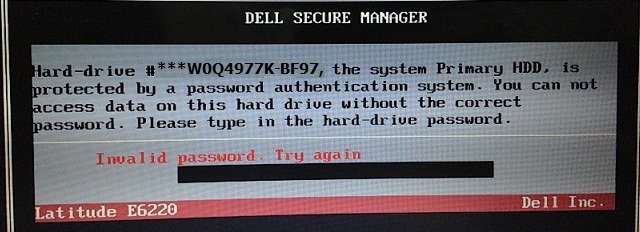
If you have a Dell Laptop Desktop or Tablet, Showing: ( 11 characters + suffix Ending in -BF97 ) Asking for Hard drive Password, You can buy your password here, so enter your Dell 11 characters code + suffix and Dell Model Number below and hit buy now.

Your HDD master password plus instructions will be sent by email within 5 minutes or the most it takes is 2 hours, password will work 100% or your money back.
Contact email is:
Supported Models We can Unlock:
If you were looking for Dell BF97 Bios Password please, click here
Main Problem and Solution on Dell Laptop Tablet and Desktop When Bios or Hard drive Password set:
When you turn on your Dell, it will ask for The Hard Drive password, it will also display the 11 charcters with suffix BF97, we will use this code and suffix to generate your hdd password.
Disable the HDD Password using our Master Password
You can change it or disable the password within bios setup
Step 1: Restart the laptop pressing F2 Every second,
Go to security
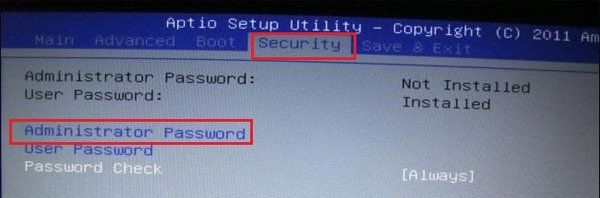
Then passwords
Go to system or administrator password
Them change or disable the password
There will be 3 fields
Input the master password we sold you in the first field,
And leave the rest blank in order to disable it!
or you can enter a new password in field 2 and 3 in order to change the password to something else
Hit F10 to save settings and exit
Disclaimer:
Please Note: We like to think that you are unlocking your own Laptop Desktop or Tablet and that you know how many passwords are set,
Know that Bios Password is used to unlock the motherboard, and hard drive password unlock only hard drives,
Bios & HDD Passwords Are Sold Separately.
Main Keywords:
Keywords: dell BF97 hdd password, dell latitude hdd password, dell hard drive password, dell bf97 hdd password, dell xps hdd password, dell precision hdd password,